Scheduling software for small business
Scheduling software designed for hourly employees.
ZoomShift helps you save hours scheduling, reduce labor costs, and have confidence that your team will show up on time.




Staff Scheduling and Time Tracking Made Easy
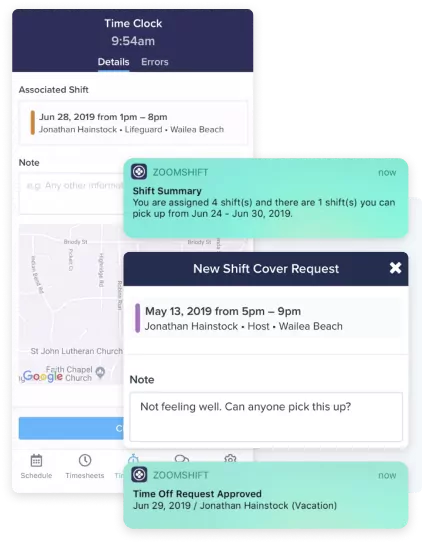
ZoomShift is designed with both the employee and supervisor in mind. Employees get the freedom to clock-in and out on the go with our web and mobile apps. From the app, you can check your schedule, log breaks, and swap shifts with colleagues.
Managers save precious time scheduling thanks to the convenience of schedule templates. Once you build the perfect work schedule, it’s as easy as copying it from day-to-day, week-to-week, or even month‑over‑month. Making tweaks is incredibly easy thanks to the sleek drag‑and‑drop interface. You also get real-time visibility into who’s working at what location and who may be absent or forgot to clock in.
Payroll Integration and Reporting Done Right
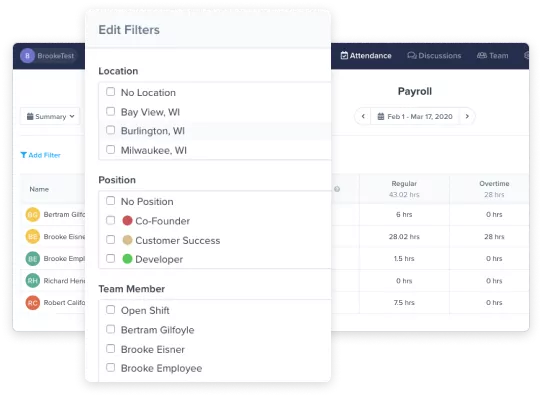
When you’ve got your hands on some approved timesheets, you’re all set to move on to processing payroll. In ZoomShift, it’s as easy as selecting the desired time period to view a breakdown of all hours worked and gross pay.
Choose from a summary view that shows regular wages, overtime, all totals, and gross pay broken down by employee, or use the daily total view to breakdown your employee totals by individual dates. Once you toss in some handy filters, you get an enhanced view by location, position, or even team member. When you’re ready, export your payroll report to CSV for easy external uploading and processing.
Services Scheduling
Frequently Asked Questions
Prices vary based on which package you select and how many active employees are using the software each month. Check out our Starter, Premium, and Enterprise solutions to see what fits your needs the best.
We offer a full-fledged 14-day free trial you can access here. No credit card is required.
If you have questions about ZoomShift, you can chat directly with our sales team by heading over to our homepage, clicking Demo at the top right section of your screen, and choosing a date and time that works best for you.
We also have an in-depth Knowledge Center jam-packed with popular articles, guides, and more frequently asked questions (FAQs).
Make work schedules faster.
Get everything you need in one place – availability, time offs, shift swaps. Use templates to build schedules, fast.
Learn MoreCopy work schedules
Use schedule templates to schedule in minutes. Drag and drop shifts in place on the calendar.
Improve staff accountability
Share schedules via text, push, and email. Automatically remind team members before their shift starts.
Everything in one place
Invite your team to view their schedules, set employee availability preferences, request time off, and pick up open shifts.
Track time easily
Use our free web and mobile time clocks to track hours. No clunky extra hardware. Track GPS and whitelist IP addresses.
Save on labor costs
Avoid costly timesheet errors before they happen. Block early clock-ins, block overtime, and fix missed punches easily.
Run payroll faster
Customize your payroll report to export all the information you need and none that you don't.
Simplify your schedule today.
Spend less time scheduling and more time investing in your team and business.